


Sivu - AI Face Photo Video App
4.17.00 Reviews
App Specs
- Version
- 1.32
- Updated On
- License
- Free
- Downloads
- 10,000+
- Developer
- MIOPS TEKNOLOJI ANONIM SIRKETI
- Categories
- Art & Design
- Platform
- Android
Screenshots

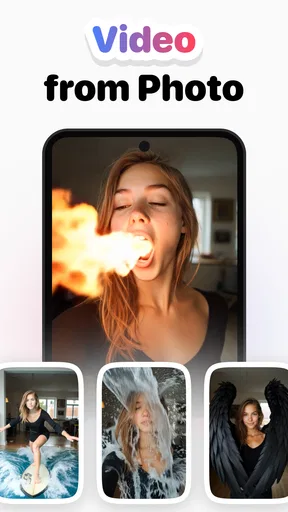
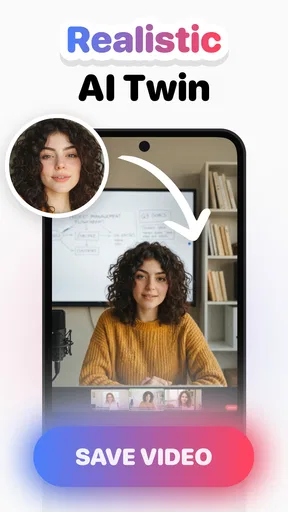


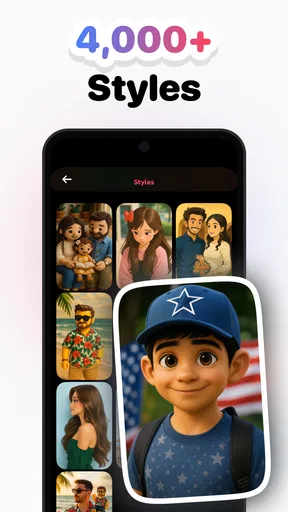
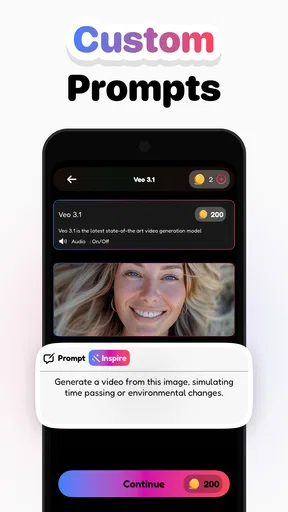

 Analysis by AppCompare
I tried Sivu as a quick way to turn ordinary photos into short, stylized videos, and my first impression was clear: this is aimed at people who want to publish something eye-catching without learning a full video editor. It sits in the Art & Design space, but its practical home is social content, especially vertical clips made for TikTok, Reels, and Shorts. The app is free to install, while some in-app purchases range from $4.99 to $47.99 per item, so the real question is not whether you can start without paying, but whether the available creative workflow is useful enough to justify spending later.
The app comes from MIOPS TEKNOLOJI ANONIM SIRKETI and currently appears as version 1.32. It is rated for Teen users, works from Android 9 onward, and has passed the 10K+ install mark. Its average rating is 4.1 from around 181 ratings, with 7 written reviews. Those figures suggest a young product with a modest but real user base rather than a mature, universally tested editor. I would approach it as an evolving creative tool: promising for fast experiments, but not something I would choose blindly for a demanding production workflow.
How Sivu feels in everyday use
The central idea is simple. You begin with a photo, choose an AI-driven video treatment, and let the app create movement or transformation around that image. That makes the experience very different from opening a conventional timeline editor, importing several clips, trimming them, adding transitions, and then adjusting every layer by hand. Sivu is built around the moment before editing: finding one strong image and seeing what kind of short video it can become.
I found that approach most appealing when I had a photo that was visually clear but too static for social media. A portrait, a fashion image, a product shot, or a travel picture can feel more alive once it is presented as a short motion piece. The app is not asking me to become a cinematographer. It is asking me to make a selection, test a direction, and decide whether the result is worth sharing.
That speed is its strongest practical advantage. If I am preparing a quick post for a small business, creating a visual teaser for an event, or making a playful clip from a friend’s photograph, I would rather test several automated ideas than spend half an hour building a timeline. The trade-off is control. An AI video maker can produce a surprising result, but surprise is not the same as precision, and I would not expect every generation to match the exact motion I imagined.
The store’s short description is simply “Sivu,” while its broader positioning focuses on AI video creation from photos. That difference is worth noting because the app’s identity is not explained through a long list of editing tools. Its appeal comes from the transformation itself. If you are looking for a conventional editor with detailed trimming, audio mixing, color correction, and layered compositing, this is probably not the first app I would open.
A practical workflow for a busy afternoon
Imagine I run a small café and have one attractive photograph of a new dessert. I could post the still image, but it may disappear among more dynamic content. With Sivu, I would start from that single photo, try a few visual treatments, and compare the generated clips on my phone. The useful part is not merely making motion; it is creating a version that gives the viewer a reason to pause. I would then keep the cleanest result, check that the subject still looks natural, and use it as a short social post.
Worth Reading Before You Choose

EA SPORTS FC Mobile 26 Is a Bigger Football Game, but It Takes Time

Flipboard Shows What News Apps Must Do Beyond the Feed

Switching to Android Auto Means Rethinking Your Driving Routine

Google Calendar Makes a Crowded Week Easier to Manage

Ludo King Makes the Most of the Minutes Between Plans

Baby Panda World Brings Quick Play to Modern Phones, but Its Game Library Feels Busy
There is an important habit I would recommend here: prepare several source images instead of relying on one. A photo with a clear subject, good separation from the background, and enough visual space usually gives an AI system more to work with than a crowded snapshot. This is one of the less obvious ways to improve the experience. The quality of the output is partly decided before Sivu even opens.
I would also keep the original photo untouched and treat each generated clip as an experiment. That makes it easier to compare outcomes and prevents a disappointing result from replacing the source material. For creators who work quickly, this small organizational step matters because automated tools encourage repeated trials, and repeated trials can become confusing when every variation looks similar in a camera roll.
Where the AI approach is genuinely useful
Sivu makes the most sense when the starting material is static but the destination is short-form video. A real estate agent could turn a polished room photograph into a more engaging teaser. An artist could animate a finished illustration for a social preview. Someone planning a birthday post could make a still portrait feel more celebratory without learning keyframes. In each case, the app reduces the distance between “I have a picture” and “I have something that behaves like a video.”
It is also useful for idea generation. I would not always use the first result as the final post, but I might use it to discover a direction. A generated movement can suggest a better crop, a different source image, or a new visual theme. That makes the app valuable even when the output needs further work elsewhere. In my experience, creative software is often most helpful when it removes the blank page, and Sivu can play that role for photo-based content.
Another practical tip is to judge the clip at the size and speed where people will actually see it. A result that looks impressive when paused may feel awkward in motion, while a subtle effect can work well in a fast-scrolling feed. I would watch each variation from beginning to end rather than choosing it from a thumbnail. This is especially important with AI-generated movement, where the transition between the opening image and the final moment can matter more than the first frame.
What changes when compared with a normal editor
Traditional mobile editors are better when I already know exactly what I want. They let me arrange multiple clips, control timing, place text at precise moments, and make deliberate corrections. Sivu is better at the earlier stage, when I want to explore what a single photograph could become. It is closer to a creative shortcut than a replacement for every part of video production.
Template-based social apps may be more suitable if I need a predictable layout, a familiar rhythm, or a finished format that already matches a campaign. Sivu has a different appeal because the photo itself remains the starting point. That can produce something less routine, but it also means the result may require more judgment. I have to decide whether the generated motion supports the subject or merely distracts from it.
For a creator who wants exact branding, a traditional editor remains the safer choice. I would use one when a logo must stay in a fixed position, when captions need to appear at specific timestamps, or when a client expects repeatable output. For a casual creator, however, that level of control can feel like unnecessary work. Sivu earns its place when speed and experimentation matter more than a carefully engineered timeline.
What the current release means for users
Version 1.32 gives the app a concrete current state, but I would not read that number as proof that every part of the experience is fully mature. The product was released on Jul 8, 2025, so it is still relatively new in the wider app landscape. That context changes how I evaluate it. I am more forgiving of a workflow that feels focused or still developing, but I also expect the product to improve steadily in clarity, consistency, and control.
For someone already using an earlier build, the most sensible expectation is continuity rather than a completely different product. The core appeal remains photo-to-video creation, and the current version should be judged by how smoothly it lets users move from an image to a shareable result. I would update before starting a serious batch of content, then test one or two source photos first instead of assuming that an existing workflow will behave identically after every change.
That small test is useful for another reason: AI results are not judged only by whether a video exports. They are judged by facial appearance, subject stability, motion quality, and whether the effect suits the image. An update can feel positive if it improves any of those areas, even without adding a dramatic new button. Conversely, a technically successful generation can still be disappointing if the subject becomes unnatural or the movement overwhelms the original composition.
Existing users should also think about their personal library. If Sivu becomes part of a regular content routine, keeping a folder of strong source images will make the app more useful than opening it randomly with whatever photo happens to be nearby. I would separate portraits, products, artwork, and landscapes, because each type of image invites a different creative decision. This is not a flashy feature, but it turns an experimental app into a repeatable workflow.
Costs, access, and the decision to continue
The free entry point is helpful because I can test the basic experience before committing money. That matters with an AI tool, where the value depends heavily on whether its visual style suits my own photos. I would not purchase immediately. I would first create several different kinds of clips, check whether the process feels comfortable, and decide whether the results are distinctive enough to use repeatedly.
The presence of item-based purchases between $4.99 and $47.99 means users should pay attention before confirming anything inside the app. I would treat paid options as a second-stage decision, not as part of the installation itself. Someone who only wants occasional birthday or travel posts may be perfectly satisfied with limited experimentation, while a frequent creator might see more value in paid access if it removes a restriction that regularly interrupts the workflow.
Because the app carries a Teen content rating, families and younger creators should still use ordinary judgment about the photos they upload and the content they publish. The rating is not a promise that every generated result will fit every audience. I would review a clip before sharing it, particularly when the source image includes another person, a child, or a recognizable private setting.
Device compatibility is reasonably broad for Android users because the minimum requirement is Android 9. That does not guarantee identical performance across all phones, though. AI media work can feel different on newer and older hardware, especially when processing or saving a result takes time. If a project matters, I would avoid closing the app during generation and keep the original image available until the final clip has been checked.
The limitations I would take seriously
The biggest limitation is the gap between creative intention and automated interpretation. I can know exactly how I want a face, object, or composition to move, but a one-tap system may choose a different emphasis. That is exciting when the result is tasteful and frustrating when it changes the character of the image. I would not use Sivu for work where every visual detail must be approved in advance.
A second limitation is that a photo-to-video tool depends strongly on source quality. A weak or cluttered image gives the app less room to produce a convincing result. This can make the app seem inconsistent when the real issue is the starting material. I would test it with a deliberately selected image before deciding that the entire product is unreliable.
There is also a creative risk in relying too heavily on automated effects. If every post begins with the same kind of transformation, the feed can start to feel repetitive. My solution would be to use Sivu as one stage in a broader process: generate a few ideas here, choose the most natural one, and add any necessary captions or final timing adjustments in a separate editor. That keeps the AI effect from becoming the whole identity of the content.
I would skip this app if my main goal were long-form editing, detailed sound design, or exact multi-layer control. I would also hesitate if I needed a dependable professional pipeline with repeatable results for many clients. In those situations, a conventional editor is slower but easier to audit. Sivu is a better fit for personal creators, social media experiments, and quick visual posts where a little unpredictability is acceptable.
Who should try it first
I would recommend starting with Sivu if you regularly have good photographs but struggle to turn them into engaging short videos. It is especially suitable for people who find a full timeline intimidating and would rather make creative choices through visual experiments. Beginners can understand the basic purpose quickly, while more experienced creators may appreciate it as a source of rough ideas.
It is less suitable for someone who wants a complete design suite in one place. If you need carefully timed text, detailed retouching, precise audio edits, and full export control, you may end up moving the result into another app anyway. That is not necessarily a flaw; it simply defines Sivu as a focused tool rather than an all-purpose replacement.
My best advice is to judge it with a small, varied test. Use one portrait, one object or product image, and one wider scene. Watch the resulting clips without pausing, then ask three questions: does the subject remain believable, does the movement improve the image, and would I actually post it? If the answer is yes for more than one type of photo, the app has a useful place in your routine.
What I would watch as the product evolves
Since the app is still relatively young and is already at version 1.32, I would watch for improvements that make the creative process more dependable rather than merely adding more visual novelty. Better consistency between attempts, clearer control over the direction of motion, and a smoother way to compare variations would all have a direct effect on everyday usefulness. Those changes would help users spend less time rejecting results and more time refining the strongest idea.
I would also pay attention to how well the app serves returning users. A novelty tool can be fun once, but a valuable creative app earns a permanent place by helping me repeat a good workflow. Useful organization, predictable handling of source images, and a clear path from experiment to finished post would matter more to me than an endless collection of effects.
My current verdict is cautiously positive. Sivu gives static photos a fast route into short-form video, and I like that it encourages experimentation without demanding advanced editing skills. The free starting point makes it easy to explore, while the paid items mean I would test the workflow carefully before spending. I recommend it to social creators, casual designers, small businesses, and anyone curious about AI-assisted visual ideas. I would not recommend treating it as a precision editor, but as a focused photo-to-video companion, it is worth trying.
Pros
- Creates realistic face-swap photos and videos with minimal editing effort.
- Offers entertaining templates for memes
- portraits
- and social media posts.
- Simple interface makes the main tools easy for beginners to understand.
- Can quickly turn still images into animated or talking-style clips.
- Useful for experimenting with creative AI effects without advanced skills.
Cons
- Results depend heavily on using clear
- well-lit face photos.
- Some effects may look unnatural around hair
- glasses
- or facial edges.
- AI processing can take time
- especially for longer video creations.
- Many premium templates or features may require a subscription or credits.
- Uploading personal photos raises privacy concerns users should review carefully.
FAQs for Sivu - AI Face Photo Video App
What is Sivu - AI Face Photo Video App used for?
Sivu is an AI-powered photo and video editing app designed to transform selfies and portraits into creative visual content. Depending on the available tools, users can enhance faces, apply artistic effects, create animated images, and experiment with face-focused templates. It is mainly intended for entertainment and social media content rather than professional photo retouching or identity verification.
Is Sivu - AI Face Photo Video App free to download and use?
The app may be available to download for free, but some features, templates, export options, or processing tools can require in-app purchases or a subscription. Before confirming a payment, check the pricing screen carefully, including the renewal terms and trial conditions. Free access may also include advertisements, usage limits, watermarks, or restrictions on high-quality downloads.
Does Sivu require an internet connection to process photos and videos?
Most AI-based effects require an active internet connection because uploaded images or videos may be processed on remote servers. Processing speed can depend on your connection, file size, and server availability. Some basic editing functions may work offline, but users should not assume that every feature is available without internet access, particularly AI transformations and video generation tools.
Is it safe to upload personal photos to Sivu?
Before uploading personal or sensitive images, review Sivu’s privacy policy and the permissions requested by the app. AI editing services may need access to your camera, photo library, and uploaded content to provide their features. Avoid using images containing private documents, confidential information, or other people without permission, and check whether uploaded files are stored, shared, or deleted after processing.
What should I know about the results and limitations of Sivu?
AI-generated edits can be entertaining, but results are not always perfect. Faces may appear distorted, details can change unexpectedly, and videos may contain visual artifacts or inconsistent expressions. Good lighting, a clear face, and a suitable image generally produce better results. The app should be used for creative purposes, and generated content should not be presented as authentic evidence or used to mislead others.


